Dynamic Line Type
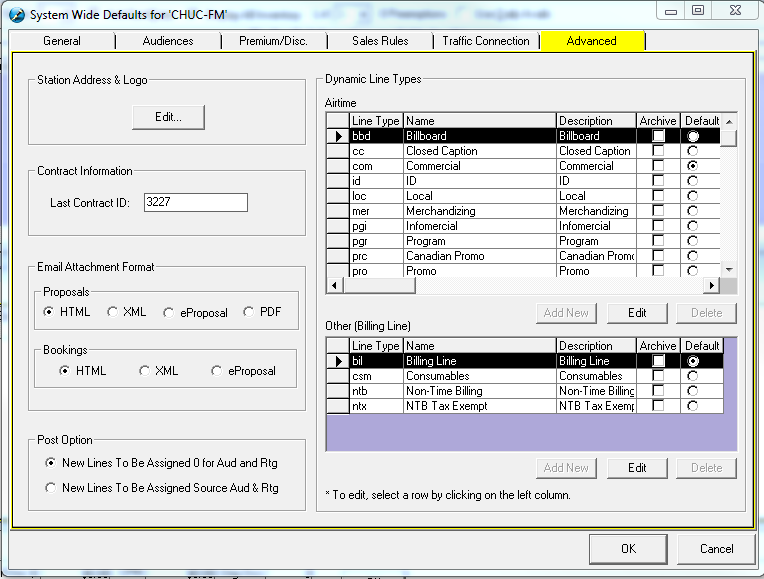
Line Types can be configured for each station/network. Available Line Types are displayed under Airtime & Other (Billing Line). These line types can be Archived or used as the default.
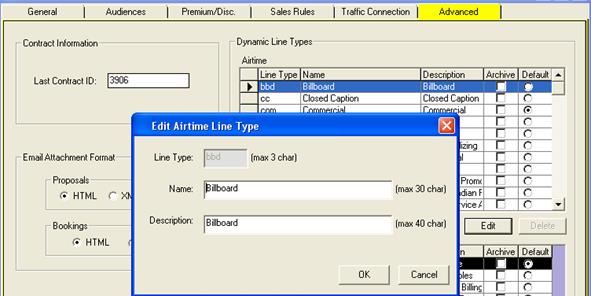
There is also the ability to define the description of the line type. Simply click on the Edit button to change existing name, or the Add New button to add to the list
Archive (Standalone & Symphony)
For Line Types which have already been used, you may Archive them so they are not displayed in the Line Types dropdown menu when Sales Users are creating Proposals. Simply use the Archive Checkbox to archive the desired Line Type.
Default (Standalone & Symphony)
To set the default Line Type, simply click on the Default radio button for the desired Line Type in Airtime & Other section. Sales Users will default to the specified Line Type when adding lines in Schedule Builder.
Post Option
Under the ‘Advanced’ Tab in System Wide Setting, Post Option on how to treat new lines can be configured.
When user copies a booking to Posted, and new lines or bonus lines are added, they may not want them to have Audience or Ratings assigned.
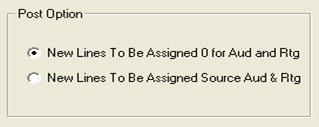
By configuring the above option, New Lines in Posted can be assigned 0 for Aud & Rtg or use the Aud & Rtg figures from the Audience Table.
There is also the ability to define the description of the line type. Simply highlight the line type that needs to be changed, and click on the Edit button. Change the name and/or the description of the line type