*Applies only to SDS Sales Systems that are linked to SDS Traffic Systems (Symphony).
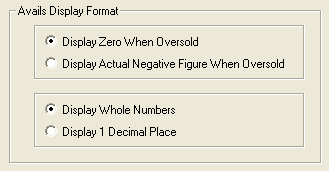
Select how you the Avails will be displayed to Sales users.
•Display Zero When Oversold – Even when program/rotation is oversold, the lowest displayed avail will remain at 0. i.e. if the program has been oversold by 3 spots, displayed avail will be 0 instead of negative 3.
•Display Actual Negative Figure – Display actual number of spot oversold. i.e. if the program has been oversold by 3 spots, displayed avail will be negative 3.
•Display Whole Numbers – If there are decimals in number of Avails for the specified spot length, system will omit them.
•Display 1 Decimal Place – If there are decimals in number of Avails for the specified spot length, system will display it.
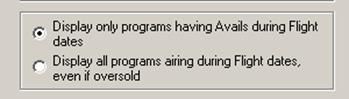
•Display only programs having Avails during Flight dates – this will only show programs if there are spots available to book, during the scheduled flight dates
•Display all programs airing during Flight dates, even if oversold – this will show programs even if the spots are sold out, during the scheduled flight dates
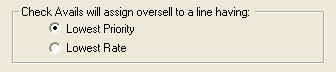
When the proposal is booked and the avails are oversold, there are two defaults to choose from:
Lowest Priority – the booking will look to the spots on the log that have the lowest priority and replace them with the higher priority spot
Lowest Rate – the booking will look to the spots on the log that have the lowest rate and replace them with the higher priced spot