The following will cover how to customize the booking approval requirements of the station.
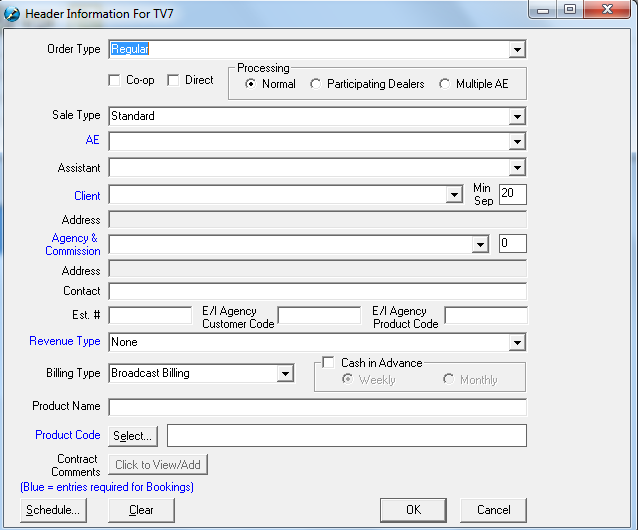
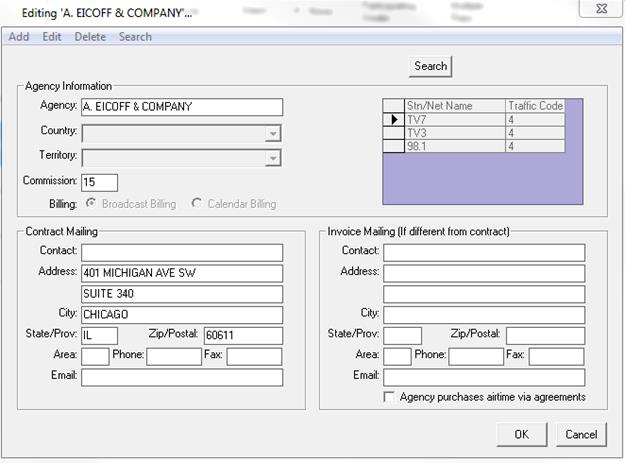
Non-Agreement Buys – The Non-Agreement Buys is associated to the Agency. To indicate if the Agency has an agreement or not, go to Header Information and select the Agency Field.
Click
on the Add, Edit or Delete button. 
Simply check mark the “Agency purchases airtime via agreements” box to indicate that there is an agreement with the agency. Therefore, if the Non-Agreement Booking Requirement setting is active, Sales Manager will need to approve all bookings with Agencies, which do not have an agreement before sending to Traffic.

Allowable AE Discount, Default Priority, and Negative Billing Lines
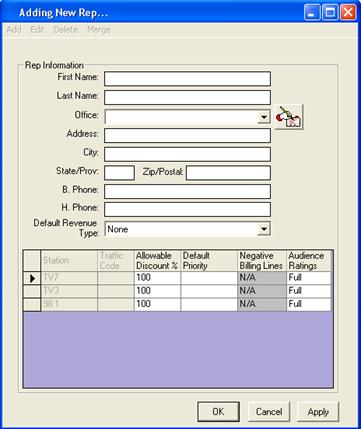
Allowable AE Discount is customized at the AE level, meaning different AE’s can be assigned different allowable discounts. To set the allowable discounts for an AE, go to Header Information and select the AE field, and click on the Add/Edit or Delete Entries button. Simply edit the Percentage in the Allowable Discount field for the respective Account Executive. If the Allowable AE Discount in Booking Requirement is active, the Sales Manager will need to approve all bookings, which are over the Allowable Discount from the AE before sending to Traffic. Click on the Add, Edit or Delete menu items. To add, simply click on Add and fill in the appropriate fields in AE Information. To edit a particular AE, select the name from the drop down menu, click Edit and make the necessary changes. To allow the AE to add in negative billing lines, this is first set up ini the system wide settings for each station. Once it has been turned on, this setting can be changed. The default priority (priority levels are 1-9) is also available on an AE by AE basis. If the AE is given access to change the audience and ratings information, ensure that the “Audience Ratings” column is set to “Full.”

Allowable Prime % - Allowable Prime % is set in the Sales Rules Tab under SystemWide Settings.

If active, the Sales Manager would have to approve a booking which exceeds the Maximum Allowable Prime % before sending to Traffic.
Finance Management
New Business – New Business detail is set in the Sales Rules Tab under SystemWide Settings. Enter the number of inactive months, which the system should consider a client as New Business.

If the Booking Requirement setting is active all Bookings, which are considered New Business will need Finance Manager approval before sending to Traffic.
Overdue Account – The Credit Limit for clients are set by Traffic, if the Booking requirement is active, the Finance Manager will need to approve all bookings that exceed the credit limit, and is overdue by `x`number of days.