When a proposal has been declined, it is important to update the status of the Proposal, so it does not stay in Pending status. This will help keep your pending folder tidy and it would also be reflected properly when pulling reports.
To decline a proposal, simply go to Proposal File and select/highlight the Proposal, which is to be declined, click the Decline button and it will move the Proposal to your Decline folder.
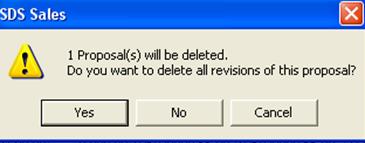
A window will pop up asking if you would like to delete the revisions of this proposal.

Each time the Proposal is revised, the system keeps a copy for history, depending on the number of times the Proposal has been revised. By clicking on Yes, all the previous revisions will be deleted but the system will still retain the latest version.
To view your Declined folder simply use the dropdown menu at the top of the window.