Limiting Sales to Displayed Avails
*Applies only to SDS Sales Systems that are linked to SDS Traffic Systems (Symphony).
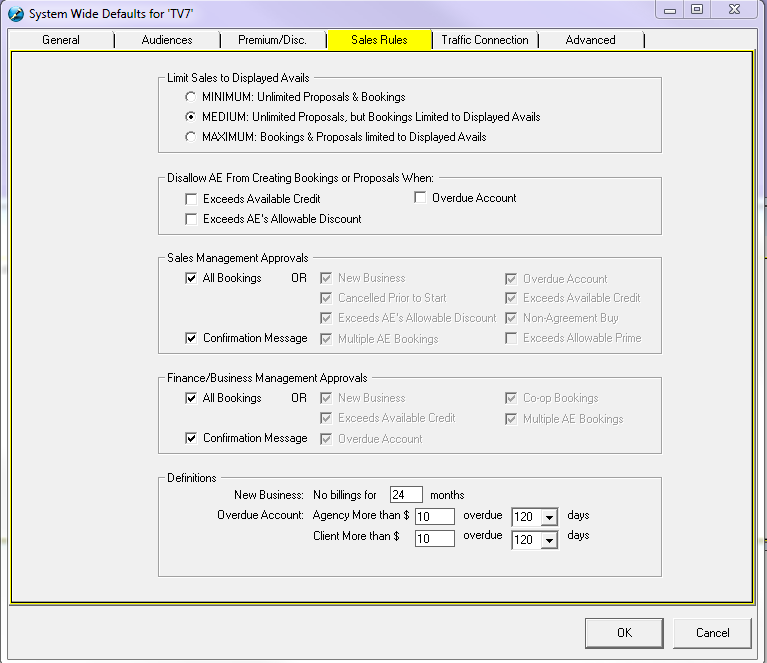
Here, the Sales Rules may be defined.
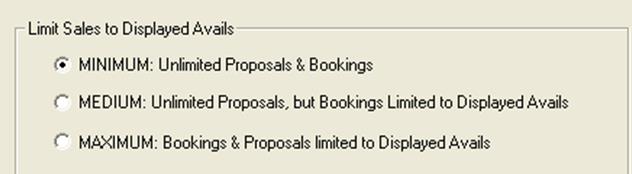
Minimum: Will allow the Sales Users to generate Proposals & Bookings regardless of number of avails.
Medium: Will allow the Sales Users to to generate an unlimited amount of Proposals, but when booking, it will be limited to the displayed avails. A Sales Manager can open the booking to book it for the Rep. A Finance Manager cannot do this.
Maximum: Will limit Sales Users to displayed Avails, so if there are no Avails for a particular program, Sales will not be able to pitch or book the proposal.
Disallow AE from Creating Bookings or Proposals When:
Exceeds Available Credit – this will stop the AE from creating a booking when the advertiser the AE is choosing for the proposal exceeds the allowable credit that is set by the finance manager in Traffic
Exceeds AE’s Allowable Discount – the AE’s discount is set by the Sales or Finance Manager, and if the AE attempts to exceed their discount level, there will be messages that will warn the user
Overdue Account – if the advertiser that the AE is choosing has not paid their invoice by the set number of days under the Definitions section (see below for further explanation), the user will not be able to book this proposal. They will have the ability to print and email, but not use the handshake button to send it to Traffic until the invoice has been paid
Exceeds Allowable Prime – this refers to the prime percentage that is set at the station level in System Wide Settings under the General tab, as well as what is set under the Definitions section (see below for further explanation).

Sales & Finance Management Approval - Enabling Booking Approval Requirements
Here, the booking requirements may be set
Sales Management Approvals
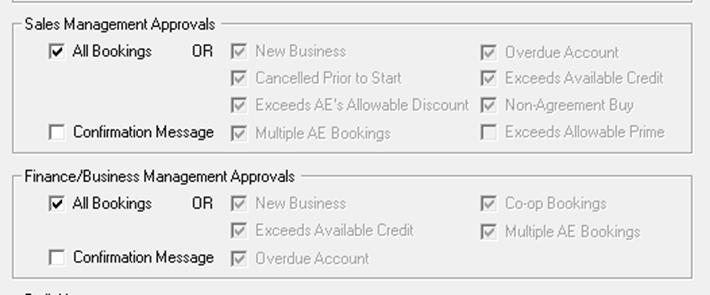
All Bookings – Sales Manager would have to authorize all bookings.
New Business – Sales Manager will be able to see and approve new business
Cancelled Prior to Start – this feature routes all cancellations when a booking has not started directly to the sales manager for approval, before it makes its way to Symphony (Traffic)
Exceeds AE’s Allowable Discount – this can be used in conjunction with the AE approval rules, or on its own. If an AE attempts to exceed what their allowable discount has been set as, the sales manager will be flagged when accepting the order in the sales approval area.
Multiple AE Bookings – Sales Manager would have to approve a booking that is designated as Multiple Reps before sending it to Traffic
Overdue Account – this can be used in conjunction with the AE approval rules, or on its own. If an AE chooses an advertiser that has not paid their invoice by the set number of days under the Definitions section (see below for further explanation), the sales manager will be flagged when accepting the order in the sales approval area.
Exceeds Available Credit – the sales manager will be flagged when the AE has booked an order when the advertiser has not fully paid their invoice. It is up to the discretion of the sales manager to accept or reject the order
Non-Agreement Buys – Sales Manager would have to authorize a booking, which is Non-Agreement Buy with the Agency before sending to Traffic.
Exceeds Allowable Prime - Sales Manager would have to approve a booking, which exceeds the Maximum Allowable Prime % before sending to Traffic.
Confirmation Message – when a Sales Manager or Finance Manager approves an order, they will be prompted to confirm that the correct order has been accepted
Finance Management
All Bookings – Finance Manager would have to authorize all bookings.
New Business – If Booking is marked as New Business, the Finance Manager would have to approve before it sending it to Traffic.
Exceeds Available Credit – If Booking exceeds the Credit Limit, the Finance Manager would have to approve it before sending it to Traffic.
Overdue Account – this can be used in conjunction with the AE approvals, or on its own. If an AE chooses an advertiser that has not paid their invoice by the set number of days under the Definitions section (see below for further explanation), the finance manager will be flagged when accepting the order in the sales approval area.
Co-Op Contracts – If Booking was a Co-Op contract, the Finance Manager would have to approve it before sending it to Traffic.
Multiple AE Bookings –Finance Manager would have to approve a booking that is designated as Multiple AE before sending it to Traffic.
Confirmation Message – when a Sales Manager or Finance Manager approves an order, they will be prompted to confirm that the correct order has been accepted
Definitions
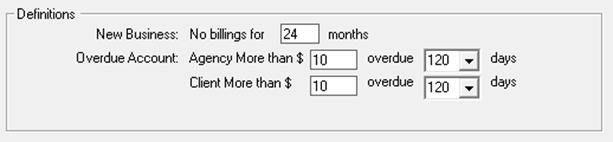
New Business – indicates the length of time that the advertiser has been off air for an ‘x’ number of months. In the example below, New Business is defined as the advertiser has not been on air for 13 months
Overdue Account - There is an option here to enter in a dollar value for how much the invoice is overdue by (minimum is $1), as well as the number of days in which the account is overdue (minimum is 30 days). This is where the system will look to when validating on the Overdue Account option in the AE, Sales and Finance approvals. It can be defined for the Agency for a dollar amount and set number of days, as well as for the Advertiser (Client).