
Go to Settings Menu and select System Wide Settings
E-Mail Attachment Settings
Account Executives have the ability to send Proposals or Bookings via e-mail as attachments. The attachments can be set to HTML, XML, or PDF format, or eProposal. To choose the settings, click on the Advanced Tab in SystemWide Settings window. A setting can also be defined for Post Analysis. When a new line is added to the Post, there is an option to have the new lines added as a default so that the Audience and Ratings are set to zero; or they can be assigned the given Rating and Audience.
eProposal
is used when sending the proposals to the advertising agencies, so that they may
import it into their system. This can be used for proposals or for
bookings. After building the order, go to the Campaign Summary page and
click on the email button -
Within this tab, there is also the ability to set the default line types. When a program is added to the schedule, the line can be automatically added as a billboard, closed captioning, commercial, etc. When clicking on the “Other” tab in the schedule, the default line type can be defined as a Billing Line, Consumable, Non-Time Billing or NTB Tax Exempt.
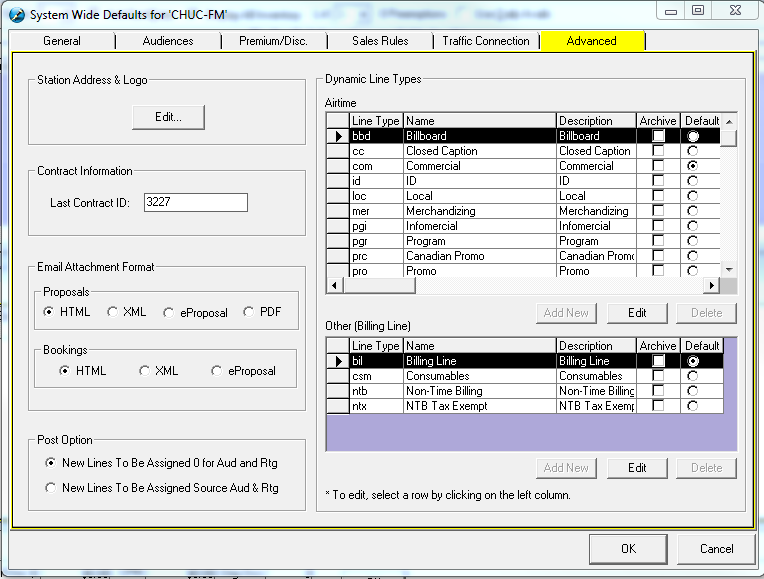
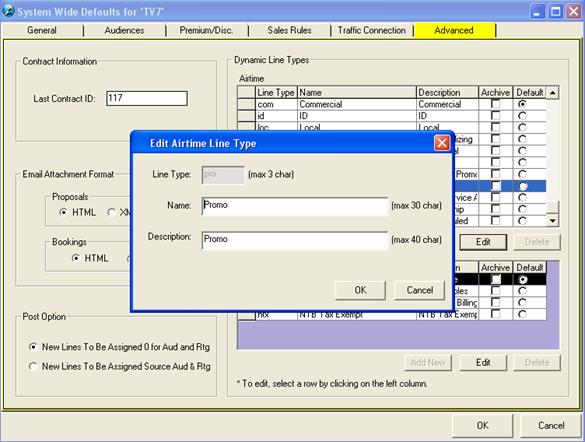
There is also the ability to edit the line types. Simply highlight the line type on the left and click on the “Edit” button.
Please Note: The settings only apply to the selected network. If multiple networks are present, you will need to configure them separately.